
2,850,000 Đ
| Thời gian | : 2 Ngày 3 Đêm |
| Phương tiện | : Ôtô |
| Ngày bắt đầu | : 8h Tối Hàng Ngày |
| Nơi bắt đầu | : Hà Nội |
[CẢNH BÁO]: Hệ thống “The Sinh Tourist – Sinh Cafe Travel” của chúng tôi là thương hiệu lâu năm, uy tín, nổi tiếng với du khách trong nước và quốc tế. Cho nên hiện nay có rất nhiều văn phòng, công ty mở ra có treo biển “The Sinh Tourist – Sinh Cafe Travel” mạo danh chúng tôi để chèo kéo khách hàng và bán sản phẩm chất lượng kém và gửi cho 1 bên tổ chức khác dẫn đến việc đi tour không đảm bảo dịch vụ chất lượng.
– Chính vì thế tập đoàn “The Sinh Tourist – Sinh Cafe Travel” của chúng tôi xin thông báo: Chúng tôi chỉ có những VĂN PHÒNG GIAO DỊCH CÓ HÌNH ẢNH ĐỘI NGŨ NHÂN VIÊN của công ty chụp ảnh trước cửa của văn phòng. Còn lại những văn phòng không có ảnh đội ngũ nhân viên đều là KHÔNG THUỘC HỆ THỐNG của “The Sinh Tourist – Sinh Cafe Travel”
– Nếu quý khách đặt dịch vụ ở nơi khác, không thuộc hệ thống chúng tôi. Chúng tôi KHÔNG CHỊU TRÁCH NHIỆM VỀ CHẤT LƯỢNG DỊCH VỤ.
– Vậy kính mong quý khách hàng hãy cẩn thận và đặt dịch vụ đúng tại văn phòng của chúng tôi để đảm bảo chất lượng dịch vụ mà chúng tôi cung cấp.
– Dưới đây là hình ảnh 8 văn phòng của tập đoàn “The Sinh Tourist – Sinh Cafe Travel” tại khu vực Hà Nội – Miền Bắc.
TRỤ SỞ VĂN PHÒNG: 15 BÁT SỨ, HÀNG BỒ, HOÀN KIẾM, HÀ NỘI

TOUR HÀ GIANG 2 NGÀY 3 ĐÊM
GIÁ CHỈ: 2.850.000VNĐ/NGƯỜI
Thời gian: 2 ngày 3 đêm / Phương tiện: Ô tô
Khởi hành: 19h30 tối – Hằng ngày

Thăm Quan Núi Đôi Quản Bạ

Thăm Quan Đèo Mã Pì Lèng
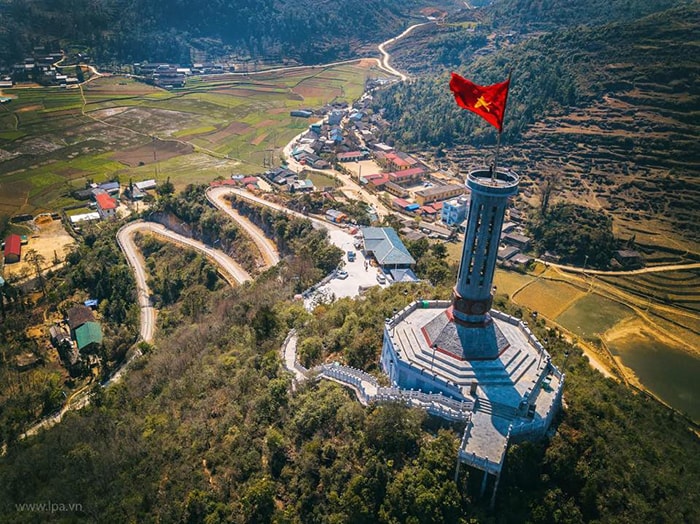
Thăm Quan Cột Cờ Lũng Cú
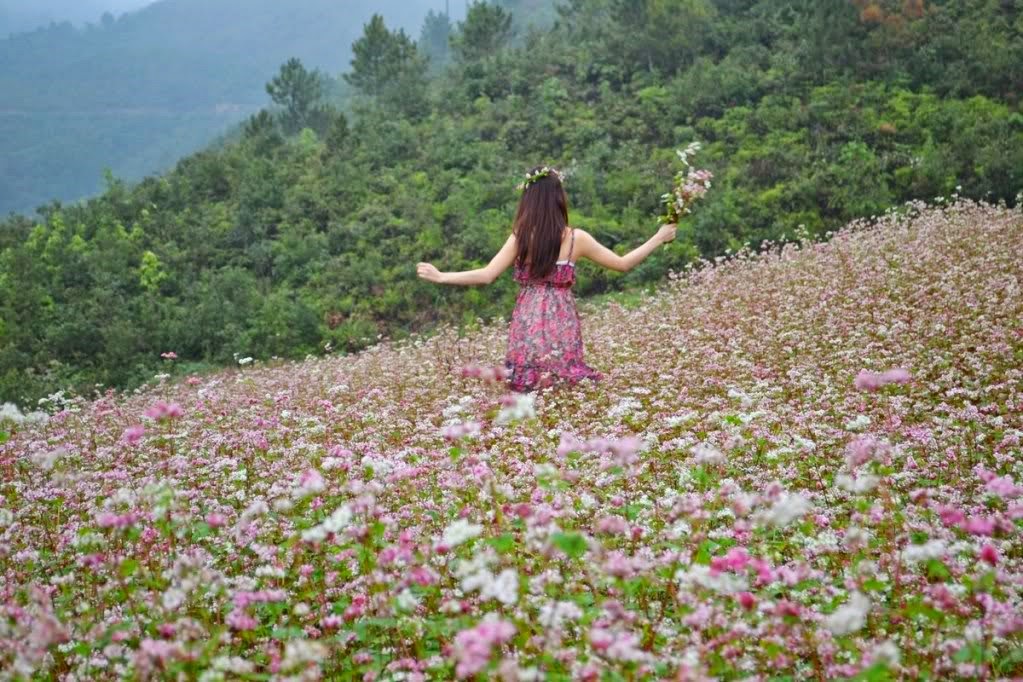
Ngắm Hoa Tam Giác Mạch

Thăm Quan Nhà Của Pao

♦ Điểm nổi bật:
– Tận mắt ngắm nhìn cao nguyên đá với phong cảnh hùng vỹ nhất của Việt Nam
– Tận mắt ngắm nhìn đèo Mã Pì Lèng hùng vỹ và hẻm vực Tu Sản sâu nhất Việt Nam
– Du thuyền trên sông Nho Quế đi xuyên qua hẻm vực Tu Sản hùng vỹ
– Khám phá nét đẹp văn hóa của đồng bào dân tộc H’Mông, Dzao, Lô Lô, Tày…
– Đến thăm Cột cờ Lũng Cú, điểm cực Bắc của Tổ quốc
– Khám phá những nét ẩm thực địa phương độc đáo
– Sống ảo với mùa hoa tam giác mạch từ tháng 9 đến tháng 12 hàng năm
– Khởi hành hàng ngày
♦ Quý khách lưu ý: Vào mùa hoa tam giác mạch từ tháng 9 đến tháng 12 hàng năm sẽ có rất nhiều các vạt hoa đẹp ở ven hai bên đường đi tại các vị trí khác nhau tùy từng thời điểm. Xe ô tô của chúng tôi sẽ dừng tại những nơi có hoa đẹp để phục vụ Quý khách chụp hình. Vào các dịp trước và sau tết âm lịch sẽ có rất nhiều hoa đào, hoa mận, hoa lê.
ĐÊM 1: HÀ NỘI – HÀ GIANG (NGỦ ĐÊM TRÊN XE)
19h00-20h00: Xe ô tô đón Quý khách tại điểm hẹn khu vực phố Cổ Hà Nội (Riêng thứ 6-7-CN đón tại số 1 chợ Gạo/ 204 Trần Quang Khải, Nhà Hát Lớn Hà Nội). Thời gian đón có thể sớm hoặc muộn hơn (nhà xe sẽ liên hệ hẹn thời gian chính xác trước khi đón)
21h00 – 22h00: Đón khách khu vực Cổng Đại học Ngoại ngữ (đường Phạm Văn Đồng), Cổng khu đô thị Ciputra (đường Phạm Văn Đồng) khởi hành cho chuyến đi du lịch Hà Giang. Nghỉ đêm trên xe gường nằm.
NGÀY 1: HÀ GIANG – QUẢN BẠ – YÊN MINH – ĐỒNG VĂN (ĂN SÁNG / TRƯA / TỐI)
04h00 – 04h30: Đến Hà Giang, xe giường nằm đưa Quý khách về Homestay để nghỉ ngơi tạm thời, vệ sinh cá nhân buổi sáng và ăn sáng tại Homestay.
07h00: Xe ô tô và hướng dẫn viên của chúng tôi tại Hà Giang sẽ đến đón Quý khách lên xe bắt đầu cho chuyến đi chinh phục Cao nguyên đá Hà Giang. Trên đường dừng chân tại các điểm điểm:
✓ Check in Hà Giang tại Km0 của Hà Giang.
✓ Dốc Bắc Sum, chụp ảnh và ngắm cảnh tại con dốc dài 8km.
✓ Cổng Trời Quản Bạ chụp hình Núi đôi Cô Tiên hay còn gọi là Núi đôi Quản Bạ và toàn cảnh thị trấn Tam Sơn từ trên cao.
✓ Thăm làng dệt lanh Thổ Cẩm Lùng Tám. Tìm hiểu về văn hóa dệt Lanh của người Mông cũng như tìm hiểu 41 công đoạn để tạo ra sản phẩm (Lưu ý: Do đường vào Lùng Tám là đường liên thôn liên xã hay bị xuống cấp hư hỏng nên nếu đoàn đi vào thời gian có sửa chữa đường hoặc trời mưa đường xấu thì sẽ bỏ qua không vào điểm này để đảm bảo an toàn cho hành trình của đoàn).
✓ Chụp hình tại Cây Nghiến cô đơn – Cán Tỷ, Quản Bạ trên cung đường mới Quản Bạ – Yên Minh.
Trưa: Ăn trưa tại nhà hàng. Chiều tiếp tục thăm quan với:
✓ Dốc Thẩm Mã, con dốc xưa kia người dân dùng để thẩm định sức khỏe của những con ngựa thồ.
✓ Phố Cáo với những ngôi nhà đặc trưng của người H’mông bởi những hàng rào đá cung quanh nhà.
✓ Dốc Chín Khoanh, con dốc ngoằn nghoèo nổi tiếng
✓ Thăm bản Sủng Là (Làng văn hóa Lũng Cẩm) thăm ngôi nhà Cổ của người H’mông với tường trình bằng đất – nơi đã được sử dụng làm bối cảnh để quay bộ phim nhựa “Chuyện của Pao” năm 2006 của đạo diễn Ngô Quang Hải được chuyển thể từ truyện ngắn “Tiếng đàn môi sau bờ rào đá” của nhà văn Đỗ Bích Thủy đã giành được 4 giải Cánh diều vàng.
✓ Dinh thự họ Vương (Dinh Vua Mèo) nằm trong một thung lũng của xã Sà Phìn, đây là dòng họ giàu có và quyền uy nhất Châu Đồng Văn vào đầu thế kỷ 20. Đoàn tìm hiểu về kiến trúc nghệ thuật, lịch sử, văn hóa của người dòng họ Vương (họ Vua Mèo).
✓ Check in chụp ảnh cánh đồng hoa Tam Gíac Mạch.
✓ Thăm Cột Cờ Lũng Cũ – nơi địa đầu Tổ quốc, điểm có vĩ độ cao nhất trên bản đồ của Việt Nam.
18h00: Về đến thị trấn Đồng Văn. Nhận phòng khách sạn, nghỉ ngơi, ăn tối. Buổi tối hướng dẫn viên cùng Quý khách dạo bộ ngắm Phố Cổ Đồng Văn đã tồn tại cùng với thời gian gần một thế kỷ. Quý khách có thể ngồi nhâm nhi thưởng thức một ly cà phê tại quán Café phố Cổ (chi phí tự túc).
Nghỉ đêm tại Đồng Văn.
NGÀY 2: MÃ PÌ LÈNG – DU THUYỀN SÔNG NHO QUẾ – HÀ GIANG (ĂN SÁNG / TRƯA / TỐI)
Sáng: Quý khách ăn sáng tại nhà hàng. Nếu vào đúng buổi sáng chủ nhật hàng tuần Quý khách có thể dạo thăm chợ phiên Đồng Văn nổi tiếng với tấp nập kẻ bán người buôn rực rỡ sắc màu quần áo của đồng bào người H’Mông, Dao, Tày…
08h00: Trả phòng khách sạn và lên xe tiếp tục hành trình với:
✓ Chinh phục đèo Mã Pì Lèng dài 16km nối Đồng Văn với Mèo Vạc, cũng là đoạn đẹp nhất trên con đường mang tên “Đường Hạnh phúc”.
✓ Chụp hình với vẻ đẹp hùng vĩ của Hẻm Tu Sản (hay còn gọi là hẻm vực Mã Pì Lèng hoặc hẻm vực sông Nho Quế) ở độ cao 1500m so với mực nước biển và độ sâu trung bình 800m – nơi địa hình bị chia cắt sâu nhất của Việt Nam.
✓ Du thuyền trên Sông Nho Quế: Lên thuyền ngược dòng Nho Quế đến với Hẻm Tu sản, là hẻm vực sâu nhất của Việt Nam nằm trên dòng sông Nho Quế. Dòng Nho Quế chảy vào Việt Nam từ địa phận thôn Séo Lủng, xã Lũng Cú, huyện Đồng Văn đi qua Hẻm núi Tu Sản chạy men theo chân đèo Mã Pì Lèng ( Chưa bao gồm chi phí xe ôm xuống bến thuyền và thuyền đi Nho Quế, trọn gói 200.000đ/khách )
♦ Trưa: Ăn trưa tại Đồng Văn. Sau bữa trưa, Quý khách tiếp tục lên xe về Hà Giang.
♦ 17h30: Về tới Hà Giang. Quý khách ăn tối tại nhà hàng. Sau đó Xe và hướng dẫn đưa Quý khách về lại Homestay để tắm rửa vệ sinh cá nhân và nghỉ ngơi. Đến giờ hẹn, xe ô tô đón Quý khách tại Homestay đưa Quý khách về Hà Nội. Sáng hôm sau, khoảng 03h00 về tới sân bay Nội Bài, 04h00 sáng về tới Hà Nội. Chúng tôi sẽ có xe trung chuyển Quý khách về lại trung tâm phố Cổ và Nhà hát lớn hoặc về điểm gần nhất cho Quý khách trên cung đường trả khách (nếu có thông báo từ trước). Kết thúc chương trình Tour Hà Giang – Du thuyền sông Nho Quế 2 ngày 3 đêm . Hẹn gặp lại quý khách!
GIÁ CHỈ: 2.850.000vnd/người.
GIÁ BAO GỒM:
– Xe ô tô khách giường nằm vận chuyển Hà Nội – TP Hà Giang // TP Hà Giang – Hà Nội hoặc chiều về bằng xe Limousine tùy thuộc lựa chọn của Quý khách.
Lưu ý: Đây là xe khách chạy tuyến thông thường, không phải xe chỉ chuyên bus du lịch.
– Phương tiện tại Hà Giang:
– Xe ô tô từ 5 đến 29 chỗ (tùy lượng khách thực tế của ngày khởi hành) đối với tour đi bằng ô tô
– Xe máy có lái, hoặc tự lái tùy theo lựa chọn của Quý khách khi đặt tour xe máy
– Chi phí đi thuyền trên sông Nho Quế (Lưu ý: Tour đã bao gồm thuyền nhưng chưa bao gồm chi phí xe ôm đưa đón bến thuyền 2 chiều. Quý khách có thể lựa chọn đi bộ hoặc tự túc chi phí thuê xe ôm để đảm bảo sức khỏe).
– 01 đêm ngủ khách sạn 1-2 sao địa phương hoặc ngủ Homestay tại Đồng Văn (tùy chọn)
Lưu ý: Homestay là ngủ tập thể (ngủ cộng đồng, sử dụng vệ sinh chung) còn ngủ khách sạn (đầy đủ tiện nghi cơ bản) sẽ theo tiêu chuẩn 02 người/phòng (lẻ ghép ngủ 3). Tùy thời điểm khởi hành, chúng tôi sẽ bố trí khách sạn tốt nhất cho Quý khách, nhưng thông thường là bố trí khách sạn 2 sao.
– 04 bữa ăn chính, mức ăn 120.000đ/suất
Lưu ý: Nếu ngày cuối Quý khách muốn về Hà Nội ngay trong đêm (khoảng 22h00 về tới Hà Nội) thì chúng tôi sẽ bố trí về trước bằng xe Limousine lúc 16h30. Quý khách sẽ chỉ ăn 03 bữa chính (bữa tối tự túc ăn trên đường về). Ngoài ra vẫn sẽ phụ thêm 50.000đ/khách theo quy định để bù vào tiền xe Limousine.
– 02 bữa sáng tại nhà hàng với thực bánh mỳ, bún, phở, bánh cuốn hoặc bún chả tùy ngày
– Vé thăm quan các điểm có trong chương trình (trừ các điểm chụp hoa của người dân trồng)
– Hướng dẫn viên (local guide) đón tiễn và phục vụ đoàn tại Hà Giang
– Nước uống phục vụ trên xe trong 02 ngày tại Hà Giang, mỗi ngày 01 chai 500ml/khách
– Bảo hiểm du lịch trọn tour
♦ KHÔNG BAO GỒM:
– Hóa đơn thuế GTGT
– Phụ thu 250.000đ/khách mang quốc tịch nước ngoài (chi phí thủ tục tại Hà Giang theo quy định)
– Phụ thu phòng đơn (áp dụng với trường hợp đăng ký ngủ khách sạn và đi một mình mà không thể ghép ngủ ghép cùng người khác hoặc do yêu cầu được ngủ riêng từ phía khách hàng)
– Đồ uống trong các bữa ăn, trong khách sạn và các chi phí cá nhân khác
– Bảo hiểm du lịch trọn tour do tính chất là khách lẻ ghép đoàn
♦ GIÁ TOUR TRẺ EM:
✓ Trẻ em từ 1-4 tuổi miễn phí (bố mẹ tự lo mọi chi phí cho trẻ, không chiếm chỗ trên xe). 02 người lớn chỉ được kèm theo 01 trẻ miễn phí, từ trẻ thứ 2 tính 75% giá tour (tiêu chuẩn như trẻ em tính phí).
Nếu 01 người lớn đi kèm 01 trẻ từ 1-4 tuổi thì trẻ phải mua 50% giá tour của người lớn (được hưởng dịch vụ như trẻ 5-9 tuổi)
✓ Trẻ em từ 5-9 tuổi tính 75% giá tour (ăn suất riêng, chỗ ngồi trên xe riêng nhưng phải ngủ chung giường với bố mẹ). 02 trẻ em tính phí cũng không có tiêu chuẩn giường ngủ riêng. Nếu trẻ em có chiều cao vượt quá chiều cao quy định về giá vé trẻ em theo quy định của khu du lịch tính theo chiều cao thì sẽ chịu phụ thu chênh lệch giá vé người lớn.
✓ Trẻ em từ 10 tuổi trở lên tính như người lớn.
♦ Thông tin tham khảo:
– Đối với hoa tam giác mạch sẽ có vào dịp từ tháng 9 đến tháng 12 hàng năm
– Đối với hoa mận, hoa đào, hoa lê sẽ có vào dịp trước và sau tết âm lịch
– Các chợ họp sáng chủ nhật: chợ Quản Bạ, chợ Yên Minh, chợ Đồng Văn, Mèo Vạc, Mậu Duệ
– Các chợ họp sáng thứ bảy: chợ xã Quyết Tiến, chợ xã Du Già
– Các chợ họp ngày Tị, ngày Hợi: Chợ Sà Phìn (trước cổng nhà Vương)
– Các chợ họp ngày Dần, ngày Thân: Chợ Lũng Phìn
– Các chợ họp ngày Tuất, ngày Thìn: Chợ Phố Cáo.

Be the first to review “Tour Hà Giang – Sông Nho Quế 2 Ngày 3 Đêm – Khởi hành tối hằng ngày”
Related products

Reviews
There are no reviews yet.